import numpy as np
import matplotlib.pyplot as plt
x = np.linspace(0, 2*np.pi, 100)
plt.plot(x, np.sin(x))
plt.title("Função Seno")
plt.show()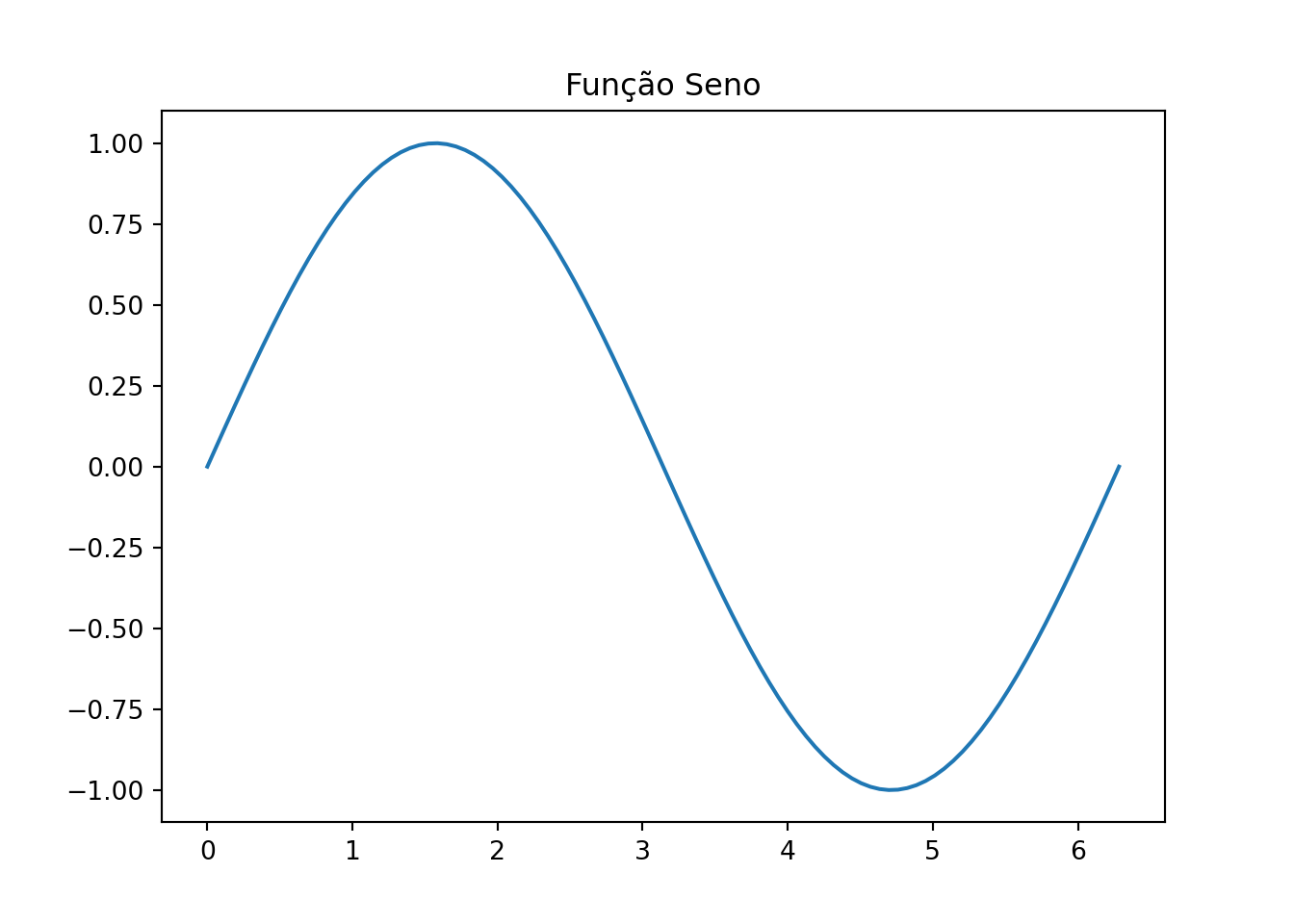
← Back to the Programming Reading Guide 👨💻
← Back to the Quarto Section 📄
← Back to the Programming Section 👨💻

This post consolidates, in a single place, the content from “Markdown Model with Quarto — Part 1” and “Part 2”, removing repetitions and organizing examples in a smoother way.
Quarto Markdown extends traditional Markdown for scientific and technical communication.
It allows mixing formatted text, executable code (R, Python, Julia, Observable), LaTeX equations, graphics, and tables in a .qmd file, automatically generating:
| Feature | Markdown (.md) | Quarto Markdown (.qmd) |
|---|---|---|
| Basic text formatting | ✅ | ✅ |
| HTML support | ✅ | ✅ |
| LaTeX equations | ❌ (limited or via extensions) | ✅ (native) |
| Executable code | ❌ | ✅ (R, Python, Julia, Observable) |
| EPUB/PDF/Slides generation | ❌ | ✅ |
| YAML support | Partial | ✅ (metadata and project configuration) |
| Target audience | Simple text | Scientific/technical publications with code |
✅ Summary: use traditional Markdown for simple text; use Quarto Markdown when you need code, math, and visualizations in reproducible documents.
# Level 1 Heading
## Level 2 Heading
### Level 3 Heading
Visualization:
You can use **bold**, *italic*, or both: ***bold and italic***.Visualization:
You can use bold, italic, or both: bold and italic.
You can also create quotations:
> Mathematics is the language with which God has written the universe. — GalileoMathematics is the language with which God has written the universe. — Galileo
- Item A
- Item B
  - Subitem B.1
  - Subitem B.2
Visualization:
1. First
2. Second
3. Third
Visualization:
[Official Quarto website](https://quarto.org)Visualization:
Official Quarto website
{width=20% style="margin-bottom: 2rem;"}Visualização:

| Name     | Age | City        |
|-|-|-|
| Alice    | 25  | São Paulo   |
| Bernardo | 30  | Salvador    |
| Carla    | 22  | Curitiba    |
Visualization:
| Name | Age | City |
|---|---|---|
| Alice | 25 | São Paulo |
| Bernardo | 30 | Salvador |
| Carla | 22 | Curitiba |
The famous Euler identity: $e^{i\pi} + 1 = 0$Visualization:
The famous Euler identity: \(e^{i\pi} + 1 = 0\)
$$
\int_0^\infty e^{-x^2} \, dx = rac{\sqrt{\pi}}{2}
$$
Visualization:
\[ \int_0^\infty e^{-x^2} \, dx = rac{\sqrt{\pi}}{2} \]
import numpy as np
import matplotlib.pyplot as plt

x = np.linspace(0, 2*np.pi, 100)
plt.plot(x, np.sin(x))
plt.title("Função Seno")
plt.show()
To show code without executing it, use a regular fenced code block (three backticks) and specify a language for syntax highlighting (for example, python).
You can combine it with collapsible callouts for better organization.
::: {.callout-note collapse=true title="💡 Static code with syntax highlighting (collapsed content)"}

```python
# Example of Circle Area Calculation
import math

raio = 5
area = math.pi * raio**2
print(f"The circle area is {area:.2f}")
```

:::
Visualization:
# Example of Circle Area Calculation
import math

raio = 5
area = math.pi * raio**2
print(f"The circle area is {area:.2f}")Use callouts to emphasize important information:
::: {.callout-note}
This is an informational note.
:::
Visualization:
This is an informational note.
::: {.callout-tip}
Tip: use `{.callout-tip}` for best practices.
:::
Visualization:
Tip: use {.callout-tip} for best practices.
::: {.callout-warning}
Warning: make sure the code is properly indented.
:::
Visualization:
Warning: make sure the code is properly indented.
::: {.callout-caution}
Caution: changes in `.qmd` files may overwrite generated `.md` files.
:::
Visualization:
Caution: changes in .qmd files may overwrite generated .md files.
::: {.callout-important}
Important: Quarto replaces RMarkdown with more modern features!
:::
Visualização:
Important: Quarto replaces RMarkdown with more modern features!
Quarto Markdown is ideal for creating reproducible, beautiful, and interactive work.
With it, you can produce everything from simple notes to complete scientific reports, keeping everything version-controlled and automated.
← Back to the Programming Reading Guide 👨💻
← Back to the Quarto Section 📄
← Back to the Programming Section 👨💻
Blog do Marcellini — Exploring Mathematics, Statistics, and Physics with Rigor and Beauty.
Created by Blog do Marcellini with ❤️ and code.
